Excel auditing, simplified
Like spellcheck for formulas
ExcelAnalyzer catches formula errors, inconsistencies,
and hidden risks before they cost you time, money, or your reputation.
See your model. Don't prompt for it.
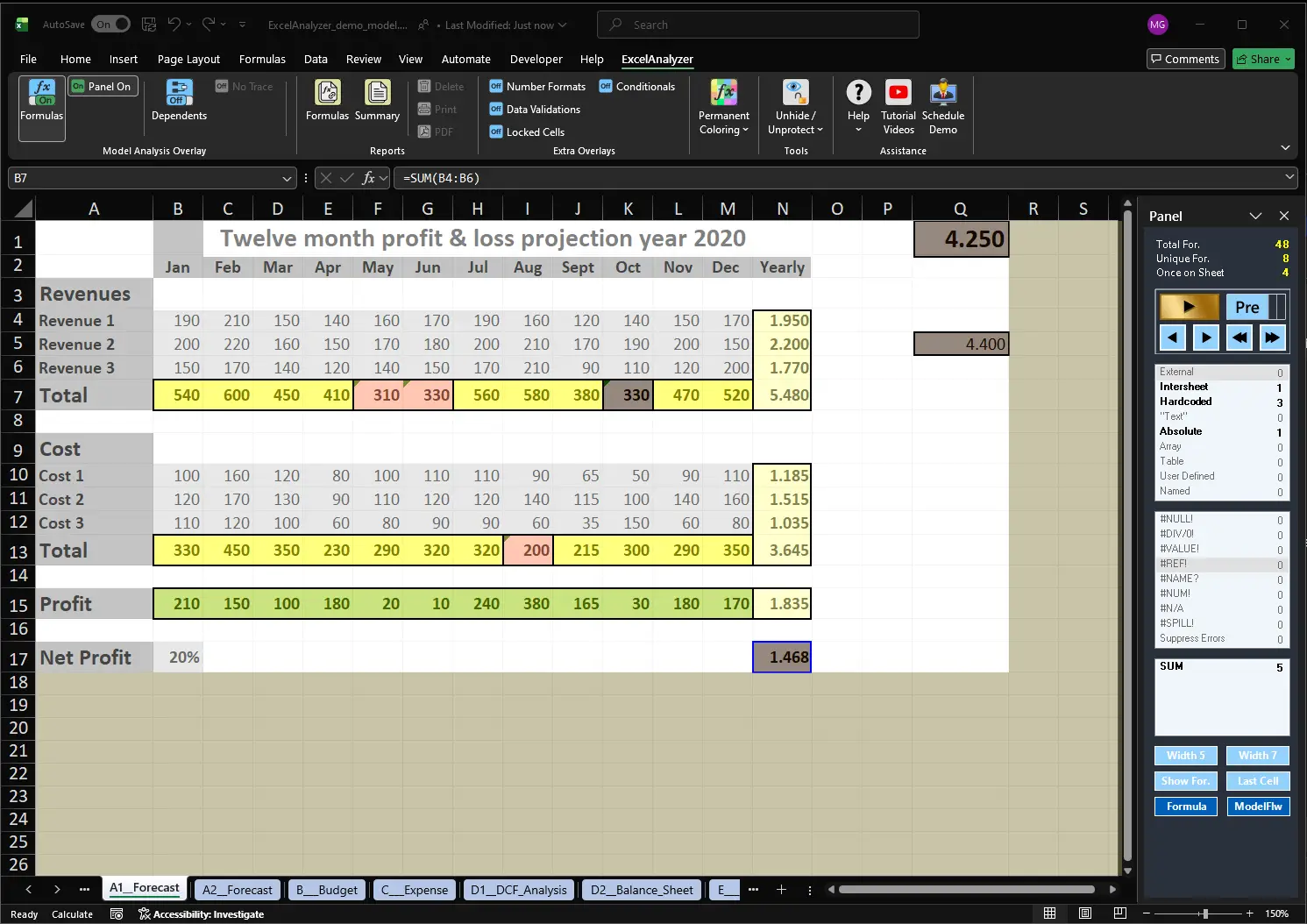
Switch on an overlay and ExcelAnalyzer draws a transparent layer over your spreadsheet, coloring every anomaly across the whole sheet at once. It uses Windows screen-drawing techniques instead of cell formatting, which makes it fundamentally different from other Excel auditing tools.
One click, whole sheet
Switch an overlay on from the ExcelAnalyzer ribbon. The coloring appears instantly, with nothing to type and nothing to wait for.
Anomalies stand out
Inconsistent formulas, hardcoded values and odd references are colored right where they live, so you see the problem in its context.
The Panel zooms in
The Panel works together with the overlay: it counts and groups what you see (external and intersheet links, hardcoded values, absolute references, error types) and takes you to the details.
Your workbook stays untouched
The overlay is drawn on screen, not in your file. Your cells’ colors and formatting are never changed.
Six overlays, one click each
Each overlay looks at your model from a different angle. Switch them on and off from the ribbon, in any combination.

Formulas
Colors formulas so inconsistent, hardcoded and unusual cells stand out across rows and columns.
Dependents
Shows which cells feed into others, so you see what a change will affect before you make it.
Number Formats
Highlights mixed and inconsistent number formats, such as numbers stored as text.
Data Validations
Marks input cells with validation rules, and the inputs that are missing them.
Locked Cells
Shows which cells are protected, and which formulas are left open to accidental edits.
Conditionals
Reveals the conditional formatting rules in your sheet, including the ones you didn’t know were there.
Faster than asking an AI
AI assistants such as Copilot answer questions about your model in words. ExcelAnalyzer shows you the answer on the sheet itself.
AI ASSISTANT
EXCELANALYZER LIVE OVERLAYS
Your models never leave your PC
ExcelAnalyzer is a standalone add-in that runs entirely inside Excel on your own computer. Your workbook data is not sent to the internet: not to us, not to a cloud, not to any AI service.
The only thing that ever goes online is the license check, never workbook content. No internet access? Register offline instead.
100% local analysis
Every check runs on your own machine, inside Excel. Nothing is uploaded to be analysed.
No AI, no cloud
Workbook data is never sent to Copilot, Claude or any other AI service.
Standalone
No admin rights required, no server, nothing to upload. Works offline, with offline license registration.
Your model stays untouched
The overlay is read-only. ExcelAnalyzer never changes your data, formulas or formatting.
From the big picture to the detail in one click
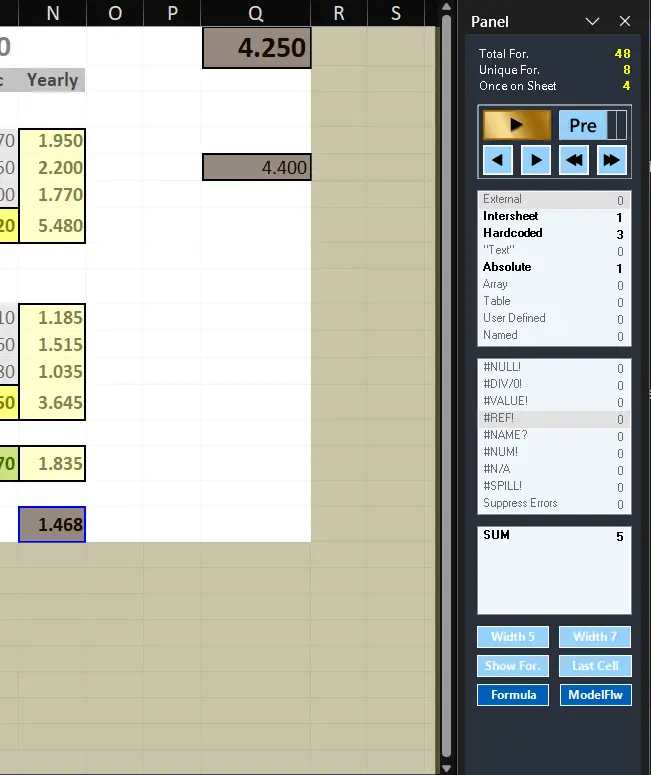
The overlay shows you where to look. The Panel works with it to zoom into the details: what kind of formula it is, how many there are, and where the same pattern repeats. See it in action in the ExcelAnalyzer tutorials.
Two worlds, one view
Live Overlays combine Windows screen drawing with Excel’s own grid. Making those two worlds work together was the hardest part of building ExcelAnalyzer, and it’s what lets you see a whole model and its spreadsheet risks at a glance, instead of checking it cell by cell.
Drawn by Windows
A transparent layer on top of Excel: your workbook’s formatting is never touched
Instant
No prompts, no waiting for an answer
Six perspectives
Formulas, dependents, formats, validations, locks, conditionals
Linked to the Panel
Overview and detail, side by side
Everything else you need for Excel model review
One-click audit report
A complete summary of every formula, error, and risk, ready to save as PDF and hand to any auditor with confidence.
Hidden data detection
Hidden rows, columns, and even “very hidden” sheets, fully exposed. Nothing in your workbook escapes the audit.
Inter-sheet and external link mapping
Every dependency and external reference, mapped and visible. Know exactly how your model connects.
Comment and Review workflow
Send cell-level queries to colleagues or clients. Their responses integrate automatically, creating a clean audit trail.
Risk assessment
ExcelAnalyzer scores your model’s overall risk level so you know what needs attention before it reaches a decision-maker. Read how it fits into spreadsheet model risk management.
Realtime
Every broken formula and inconsistent value is flagged the instant it appears, highlighted directly in your spreadsheet.
Audit and Correct Spreadsheets Efficiently
Wish Excel had a formula check like Word's spell check?
That’s exactly what ExcelAnalyzer is, and much more.
It audits structure, consistency, hidden data, and model logic in ways no spell check ever could.




What our customers say
“It cuts through a spreadsheet like a knife. Hours of manual checking, gone. Total confidence in my models.”
Financial Analyst
“Our internal and external auditors now have full confidence in our accuracy. That assurance used to take days to build.”
Senior Financial Controller
“The detail in the reports is astonishing. Every formula highlighted, every error flagged. We’ll never go back.”
Finance Director
Try ExcelAnalyzer free for 10 days
No credit card required, no obligations and fully functional. Questions first? Read the ExcelAnalyzer FAQ.