Organizations responding to model risk management expectations such as OSFI E-23, SR 11-7, ECB TRIM, and PRA SS1/23 often begin with a simple question:
“How many spreadsheet models do we actually have?”
Discovery and inventory tools help answer that question. They locate spreadsheets, identify owners, and establish an inventory.
But inventory alone does not tell you:
- How a model works
- Whether the calculations are reliable
- Where hidden risks exist
- Whether documentation is complete
- Whether independent validation can be performed efficiently
- Whether changes have introduced new risks
This is where spreadsheet analysis technology becomes critical.
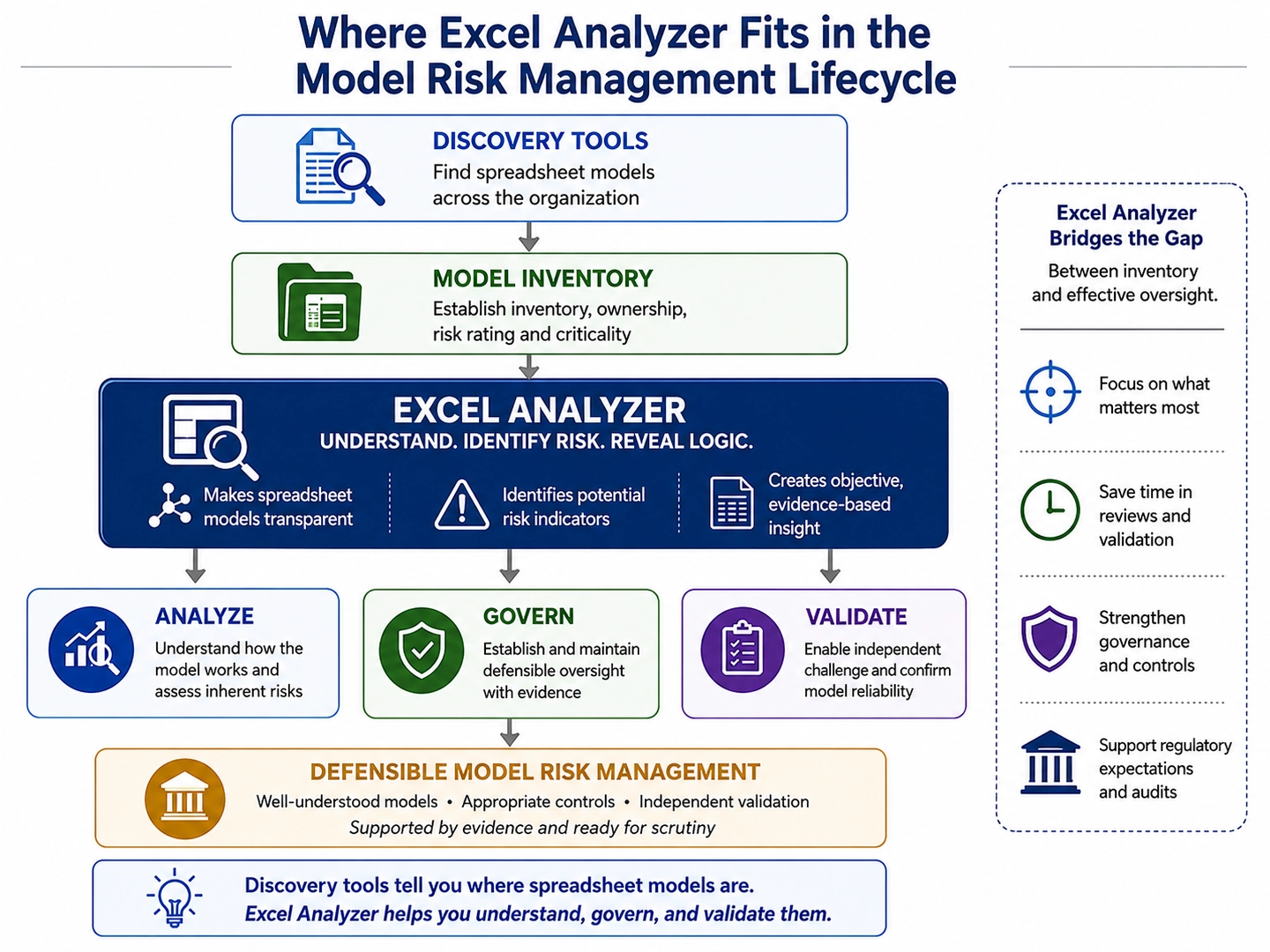
The Model Risk Management Lifecycle
A practical MRM workflow for spreadsheet models often looks like this:

Many organizations invest heavily in the first three stages because regulators increasingly expect comprehensive model inventories.
Discover, Inventory, and Classify: these phases answer what models exist?
Typical technologies include:
- Spreadsheet discovery tools
- Data governance platforms
- CMDB systems
- SharePoint and M365 inventory tools
- Metadata repositories
Typical outputs include:
- Model inventory
- Ownership assignments
- Risk ratings
- Criticality classifications
These activities establish visibility. They do not establish model understanding. The highest concentration of operational risk frequently emerges in the Analyze, Govern, and Validate phases.
Analyze: Understanding How a Spreadsheet Model Really Works
Once a spreadsheet has been identified as a model, the next challenge is understanding how it works and assessing the risks it may contain. This is often more difficult than expected. Over time, business-critical spreadsheets evolve through multiple owners, enhancements, and workarounds, becoming increasingly complex and difficult to review manually.
Model risk management requires more than knowing a spreadsheet exists. Organizations must understand how calculations are performed, what assumptions are embedded within the workbook, and where potential sources of error may reside.
ExcelAnalyzer helps provide that understanding by making spreadsheet models more transparent and easier to assess. It enables reviewers to quickly gain insight into:
- Workbook structure and architecture: how worksheets, formulas, and calculations are connected.
- Calculation flow and dependencies: how data moves through the model from inputs to outputs.
- Potential risk indicators: including hard-coded values, hidden content, broken links, formula inconsistencies, and areas of elevated complexity.
- Model transparency: making calculation logic visible and easier to explain, review, and document.
By exposing the structure and logic of a spreadsheet model, ExcelAnalyzer helps transform what can often feel like a “black box” into a more understandable and manageable asset. This allows model owners, risk teams, and validators to focus their attention on the areas that matter most, improving both the efficiency and effectiveness of model reviews.
In the context of model risk management, analysis is ultimately about understanding. Before a model can be governed, validated, or monitored, its structure, logic, and risks must first be understood. ExcelAnalyzer helps provide that foundation.
Govern: Establishing Defensible Oversight
“Good governance is not simply knowing that a model exists; it is being able to demonstrate that its risks are understood, its controls are appropriate, and its use is supported by evidence.”
Effective model governance requires more than maintaining an inventory of spreadsheet models and assigning ownership. Organizations must be able to demonstrate that models are understood, risks have been assessed, and appropriate oversight is being exercised throughout the model lifecycle.
This can be particularly challenging for spreadsheet-based models. Critical business logic is often embedded within workbooks that have evolved over many years, making governance decisions dependent on individual knowledge and manual reviews. As a result, oversight can become inconsistent, difficult to document, and challenging to defend during audits or regulatory examinations.
ExcelAnalyzer helps bring greater consistency and transparency to the governance process by providing objective information about a model’s structure, complexity, dependencies, and potential risk indicators. Rather than relying solely on interviews or manual inspections, governance teams can leverage documented analysis results to support informed decision-making.
The outputs generated through analysis can become part of a model’s governance record, including:
- Structural documentation that helps explain how the model operates.
- Complexity and risk assessments that support model classification and review requirements.
- Dependency and formula inventories that provide insight into model implementation.
- Identified findings and exceptions that can be tracked through remediation and review processes.
These artifacts help create a repeatable and evidence-based approach to spreadsheet governance. They support model approval decisions, periodic reviews, audit activities, and ongoing oversight by providing tangible evidence that risks have been assessed using a consistent methodology.
Ultimately, good governance is not simply knowing that a model exists; it is being able to demonstrate that its risks are understood, its controls are appropriate, and its use is supported by evidence. ExcelAnalyzer helps provide that evidence, creating a stronger foundation for defensible model governance.
Once governance expectations have been established, the next step is determining whether the model can withstand independent challenge and validation.
Validate: Enabling Effective Independent Challenge
Independent validation is a cornerstone of effective model risk management. Whether driven by regulatory expectations, internal governance standards, or risk management best practices, validation provides an objective assessment of whether a model can be relied upon for decision-making.
For spreadsheet-based models, however, validation often begins with a significant challenge: understanding how the model actually works. Complex workbooks may contain thousands of formulas, multiple worksheets, hidden logic, embedded assumptions, and years of incremental modifications. Before validators can assess the appropriateness of a model, they must first understand its implementation.
ExcelAnalyzer helps accelerate this process by providing visibility into the structure and operation of spreadsheet models. Rather than spending valuable time manually tracing formulas and dependencies, validators can quickly gain insight into how calculations flow through the workbook and where potential risks may exist.
This supports validation activities by providing:
- Calculation and dependency visibility that helps reviewers understand model implementation.
- Identification of risk indicators such as hard-coded values, hidden elements, broken links, and formula inconsistencies.
- Structural documentation that supports review, challenge, and validation testing.
- Greater transparency into the logic that drives model outputs.
By making spreadsheet models easier to understand, ExcelAnalyzer allows validators to focus more of their effort on evaluating assumptions, testing calculations, assessing controls, and challenging model design decisions. This helps strengthen the effectiveness of the validation process while improving consistency and efficiency.
Ultimately, validation is about providing confidence that a model is operating as intended and producing reliable results. ExcelAnalyzer supports that objective by making spreadsheet implementations more transparent, understandable, and reviewable.
As organizations increasingly adopt AI-assisted tools to create and modify spreadsheet models, the need for transparency and independent challenge will only continue to grow.
The AI Factor: Why Spreadsheet Transparency Matters More Than Ever
The growing adoption of AI-assisted development tools is changing how spreadsheet models are created and maintained. Business users can now generate complex formulas, automate calculations, write VBA code, and even build entire spreadsheet models with the assistance of generative AI.
While these capabilities offer significant productivity benefits, they also introduce new model risk management challenges. Models can now be developed or modified more quickly than ever before, often by individuals who may not fully understand the logic, assumptions, or implementation details generated by AI. As a result, organizations may find themselves relying on increasingly sophisticated spreadsheet models that have received less scrutiny during development.
This does not change the fundamental principles of model risk management. If anything, it reinforces them.
Organizations remain responsible for understanding how models operate, assessing their risks, validating their implementation, and governing their use. Whether a spreadsheet model is created manually or with AI assistance, decision-makers must still be able to explain how results are produced and demonstrate that appropriate controls have been applied.
This is where transparency becomes increasingly important. By providing visibility into workbook structure, calculation logic, dependencies, and potential risk indicators, ExcelAnalyzer helps organizations understand and evaluate spreadsheet models regardless of how they were developed. It provides objective evidence that can support analysis, governance, and independent validation activities in an environment where model complexity and development speed continue to increase.
Ultimately, AI may accelerate the creation of spreadsheet models, but it does not reduce the need for oversight. In fact, as spreadsheet development becomes easier, the ability to understand, govern, and validate those models becomes more important than ever.
Whether a spreadsheet model is built by a financial analyst, a business user, or an AI assistant, the governance challenge remains the same: organizations must be able to understand it, validate it, and defend it.
Ready to Better Understand Your Spreadsheet Models?
Whether your objective is to support OSFI E-23, SR 11-7, ECB TRIM, or PRA SS1/23 compliance, strengthen spreadsheet governance, improve validation efficiency, or better understand the risks embedded within critical spreadsheet models, the first step is gaining visibility into how those models actually work.
Download a trial copy of ExcelAnalyzer and see how greater transparency can help you analyze, govern, and validate your organization’s spreadsheet models with confidence.
Continue the Conversation
You can connect with me on LinkedIn to discuss spreadsheet governance, model risk management, and regulatory expectations.